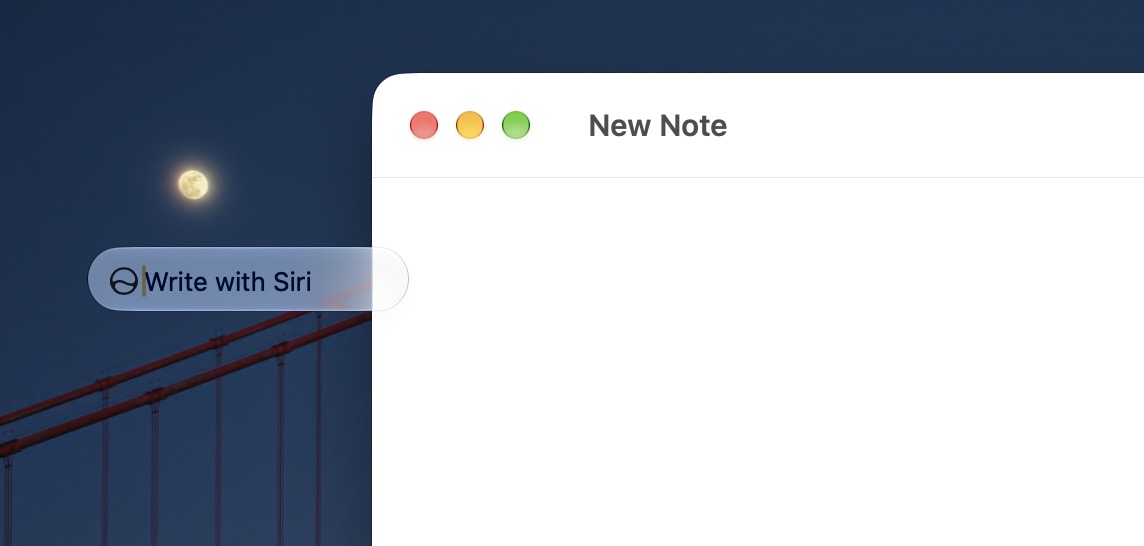
The new 'Write with Siri' feature in macOS 27 Golden Gate, iOS 27, and iPadOS 27 enables users to compose, rewrite, and proofread text using Apple’s voice assistant. This function is accessible within any application where text input is possible, including Apple's Mail, Safari, Notes, and third-party applications that support it.
Read More
To utilize 'Write with Siri,' users must enable Siri on their compatible devices and ensure they are running the appropriate system software. Additionally, apps must be updated to support this feature.
Using 'Write with Siri' is straightforward:
1. Open any compatible app and select a text entry point.
2. Tap the floating Siri icon on a Mac or iPad, or the 'Write with Siri' text above the keyboard on an iPhone.
3. Enter a prompt, such as, “write a professional email reply to Bob expressing excitement about the November conference.”
4. Wait for Siri to generate the text, which will then appear on screen.
Users can either accept the initial text provided by Siri or request revisions by specifying how they would like the writing to change, whether to adjust the tone, length, or subject matter.
This tool can be helpful for various writing tasks, making it easier to draft emails or overcome writer's block. Users are encouraged to experiment with 'Write with Siri' to see how it can enhance their writing workflow.
Currently, the only way to disable the 'Write with Siri' button is to turn off Siri entirely. There are suggestions for future updates to provide more control over this feature without disabling Siri. Alternatively, Mac users may use a Terminal command to disable the floating button, although this requires a level of technical comfort.
Feedback regarding the usefulness of AI writing tools integrated into the latest operating systems is welcomed.